
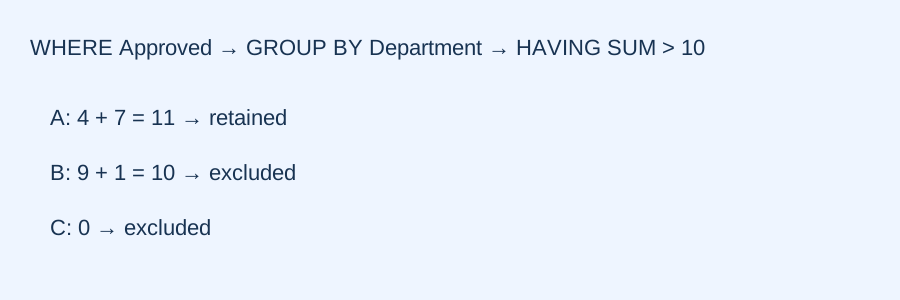
An original DP-900 SQL foundation guide that separates row-level eligibility from grouped-result thresholds. It uses a different task and dataset from the companion normalization and join lesson.
Name the business rule before the SQL clause
A fictional community project wants departments whose approved donations total more than ten units. The supplied units are teaching numbers, not currency amounts or a funding recommendation. The complete Donations table has six rows: (A,4,Approved), (A,7,Approved), (A,20,Draft), (B,9,Approved), (B,1,Approved), and (C,0,Approved). Each row represents one recorded donation. Two requirements matter: only approved rows are eligible, and the combined eligible total must exceed ten. A query that checks whether one individual donation exceeds ten asks a different question. Write both requirements separately before choosing WHERE, GROUP BY or HAVING. This makes a plausible-looking query answerable from the stated task rather than from memorized clause names.
First decide which rows are eligible
WHERE Status='Approved' selects the five approved records before grouping. A's draft twenty-unit record is excluded even though it is the largest single amount. The eligible amounts are therefore A:4 and 7, B:9 and 1, C:0. This decision is about record membership, not department success. The zero-unit record remains a supplied approved record; zero is a value, not an absent row. A common failure is to aggregate every amount first and then apply a condition that mentions only the resulting total. That would let the draft donation inflate A's result to thirty-one and would violate the eligibility requirement. A later threshold cannot retroactively prove that the correct source rows entered the total.
Then combine rows at the requested grain
GROUP BY Department defines one result group per department among the eligible rows. Compute each total explicitly: A has 4+7=11, B has 9+1=10, and C has 0. This grouping grain is essential. If you group by Department and Amount instead, you can split one department into several amount groups. If you select an overall grand total without a department grouping, you lose the requested department-level answer. Neither alternative is inherently meaningless, but neither answers this task. Before accepting an aggregate, say what one output row represents and identify which input records contributed to it. In a report, label the result with its unit and grain so that the reader does not confuse a donation count with a donation total.
As a separate check, grouping by Department and Status before removing drafts would create an A/Draft group as well as A/Approved. Keeping the word Department in the query therefore does not prove that every output row has the requested grain. List all grouping columns and explain why each belongs. The complete dataset lets another reviewer reconstruct the result without accepting an unexplained model assumption.
Use the group threshold at the correct stage
HAVING SUM(Amount)>10 filters the grouped results. Only A qualifies because eleven is greater than ten; B's exact boundary value ten does not qualify and C's zero does not qualify. An appropriate query is SELECT Department, SUM(Amount) AS Total FROM Donations WHERE Status='Approved' GROUP BY Department HAVING SUM(Amount)>10. In contrast, adding WHERE Amount>10 with the approved-status filter removes every record in this dataset: none of the individual approved donations exceeds ten. That result can execute without a syntax error while still answering the wrong question. The remedy is not to swap a clause until the output looks attractive, but to connect each condition to either row eligibility or a property of the completed group.
Challenge the boundary and the denominator
Change the requirement to totals of at least ten. The comparison becomes >=10, and both A and B qualify. No source data changed; the result changed because the decision boundary changed. Now ask for the number of approved donation records per department instead of their total amount. COUNT(*) gives A two, B two and C one. C's record still counts even though its Amount is zero. If the design allowed Amount to be NULL, COUNT(Amount) would instead count only known amount values; that separate missing-value policy must be stated. Do not silently turn NULL into zero or change the denominator to whichever records make a desired answer. These small counterfactuals test whether the reasoning transfers beyond one remembered numeral.
Make the answer independently reviewable
A short review trail should contain the complete input table, the eligible rows, each group's calculation, the threshold and the final result. A second person can then challenge the strongest competing query: perhaps it used a row threshold, included the draft record, changed the grouping grain, or treated an inclusive boundary as exclusive. Executing this portable SQL subset in a small local database provides an additional arithmetic and query-semantics check, but it does not certify Azure service behavior, every T-SQL extension or production performance. The linked lesson covers entity ownership and join cardinality as a separate prerequisite. Together they help distinguish a correct calculation from a correct answer to the user's actual question, while remaining selected foundations rather than a complete SQL course or calibrated examination simulation.
Apply the guide
For the complete Donations table, list the totals after filtering to Approved rows, then apply HAVING SUM(Amount)>10.Reveal explanation
A=11, B=10, C=0. Only A passes the strict >10 boundary. The draft A=20 row is excluded before grouping.
Would WHERE Status='Approved' AND Amount>10 followed by grouping produce the same result? What changes if the grouped threshold becomes >=10?Reveal explanation
No approved individual Amount exceeds 10, so that WHERE condition removes every row. With the original Approved-only filter and HAVING SUM(Amount)>=10, A and B pass.
Turn the idea into practice.
Apply the rule to a new case, then explain your choice.
Practice this skillSources & authorship
Official SQL and foundational data references support the rules; all tables, quantities, explanations and checks are original. No official examination items reproduced.
Original OpenExam guide and diagram.
Independent educator review is pending. This guide is not an official exam paper or a video transcript.
Microsoft Learn: rd-dp-countMicrosoft Learn: rd-dp-groupMicrosoft Learn: rd-dp-sql